
Master the Blueprint of Modern AI Engineering Go Beyond Prompting and Learn How Real AI Systems Are Built, Scaled, and Deployed in Production. AI engineering is no longer about calling...
https://systemdrd.com/ebooks/ai-engineers-blueprint
Most “AI demos” are a text box wired to an LLM. That works until the model tries to search the web, read a URL, or spend money on tools without you noticing.
This project is different. It is a small but complete app: a React chat UI, a FastAPI backend, and an agent definition you keep in Git. The interesting part is not the chat bubbles—it is how the same UI talks to three different runtimes (cloud managed agent, local open-source agent, or your own LangGraph deployment) and how it pauses the agent until a human approves a web search.
If you have been following system design topics—timeouts, idempotency, backpressure, “who owns state?”—you will recognize the same questions here, just with agents instead of microservices
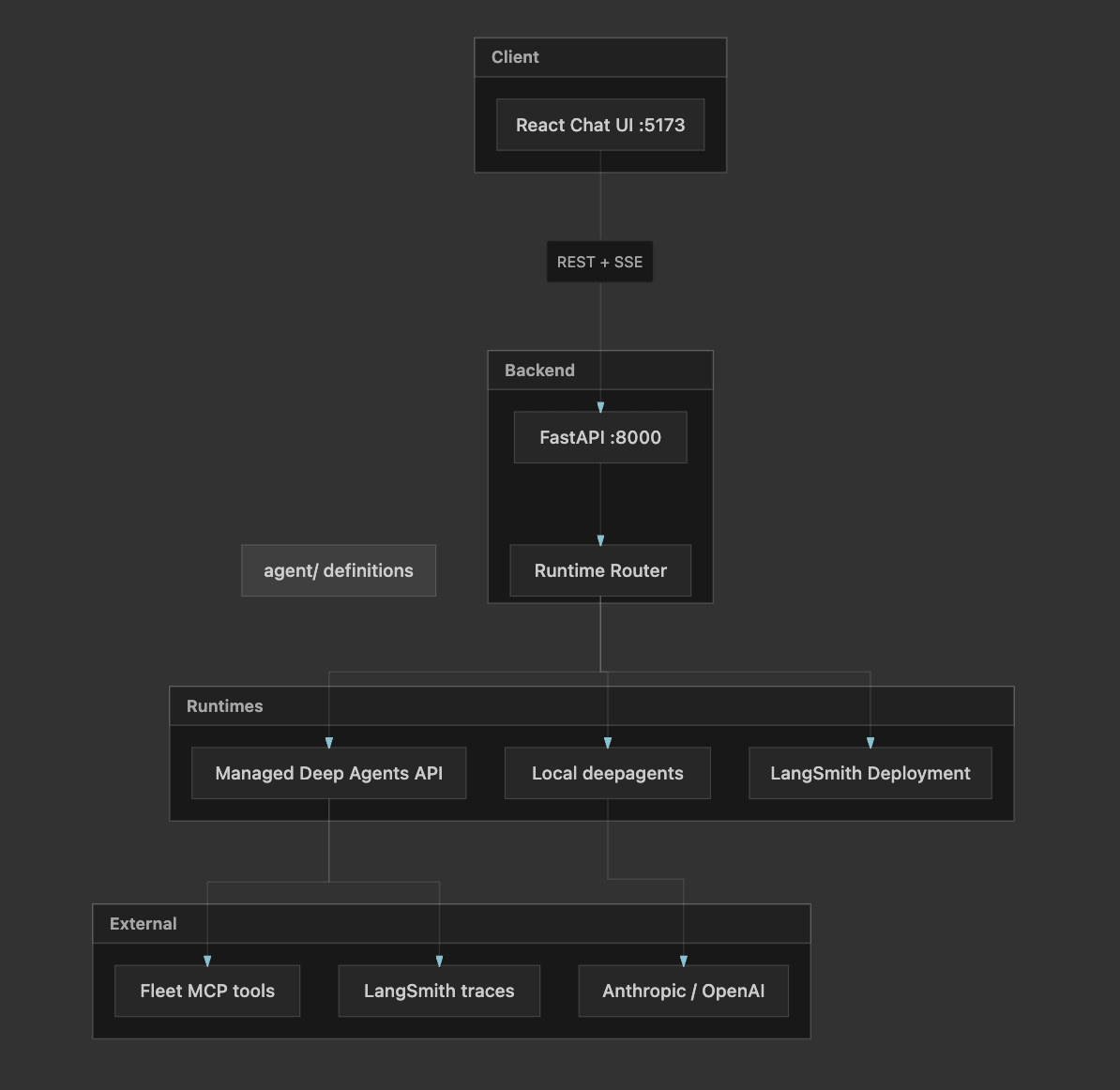
What you are looking at
Open the app and you get a Research Assistant. You type a question. The agent can plan, take notes in a virtual filesystem, search the web, read pages, and even call a fact-checker subagent for specific claims.
Github : https://github.com/sysdr/langchain-echosystem
The repo is called langchain-echosystem . Layout:
langchain-echosystem/
├── agent/ ← what the agent *is* (instructions, tools, skills)
├── backend/ ← API + runtime switch
├── frontend/ ← chat UI + approval modal
└── langgraph.json ← optional deploy to LangSmith
Three layers, one product:
LayerJob
agent/
Personality, tools, when to ask a human
backend/
Pick runtime, stream tokens, handle interrupts
frontend/
Show chat, block input until you Approve/Reject
The agent is just files in agent/
Managed Deep Agents let you define an agent from the repo instead of clicking around a dashboard. That matters for newsletters and teams: version control beats copy-paste.
Instructions (agent/AGENTS.md)
The agent is told to behave like a careful researcher:
Clarify vague questions
Search when facts need the outside world
Not invent citations
Use bullet points and links
Delegate doubtful claims to a fact-checker
There is also a /memories/preferences.txt convention—durable user prefs saved across chats. That is a simple pattern for “long-term memory” without a separate database in this demo.
Tools (agent/tools.json)
Two tools come from LangChain’s Fleet MCP server:
tavily_web_searchread_url_content
The important line is interrupt_config. Web search is set to require human approval; reading a URL does not:
“interrupt_config”: {
“https://tools.langchain.com::tavily_web_search::Fleet”: true,
“https://tools.langchain.com::read_url_content::Fleet”: false
}
From a system design angle: this is policy as data. You are not hard-coding “if tool == search then pause” in Python; you declare it once and provision pushes it to the cloud agent.
Skills and subagents
agent/skills/research/SKILL.md— multi-step research workflow (plan → search → notes → synthesis).agent/subagents/fact-checker.md— narrow job: verify claims, label Supported / Contradicted / Insufficient evidence, cite URLs.
Subagents are the agent equivalent of calling a specialist service instead of bloating one prompt.
One backend, three ways to run the brain
The backend does not assume you always have LangSmith preview access. AGENT_RUNTIME in .env can be auto, managed, local, or deployment.
backend/app/config.py resolves auto like this:
If
LANGGRAPH_DEPLOYMENT_URLis set → deploymentElse if
MANAGED_AGENT_ID+ API key → managedElse → local
get_runtime() in backend/app/runtime/__init__.py returns one of three classes with the same interface: create thread, stream chat, resolve interrupt, resume stream.
That is classic strategy pattern thinking: one API contract, pluggable implementations. Your frontend never branches on “are we local today?”
Managed mode (production-shaped)
ManagedRuntime talks to LangSmith’s /v1/deepagents API via DeepAgentsClient. It creates a thread, starts a streamed run, maps LangChain events to SSE:
messages→ token chunks for the UIvalues→ if there is an interrupt, emit aninterruptevent
You provision the cloud agent once:
make provision
backend/scripts/provision_agent.py reads everything under agent/, builds a JSON payload (instructions, tools, subagents, skills), POSTs or PATCHes the Managed Deep Agents API, and writes MANAGED_AGENT_ID back into .env. Change AGENTS.md, run provision again—the cloud agent updates. Git is the source of truth.
REQUIRE_HITL_APPROVAL env toggles whether web search needs approval at provision time—useful for demos vs stricter prod.
Local mode (laptop-friendly)
LocalRuntime uses open-source deepagents with an in-memory checkpointer. It still loads AGENTS.md as the system prompt, but web search is a stub that tells you to use managed mode for real search.
Good for UI work and backend tests without cloud keys. Bad for “did it really find that paper?”—by design.
Deployment mode (your own graph)
backend/agent.py defines a LangGraph-compatible graph with create_deep_agent. langgraph.json points at it for langgraph up. Point LANGGRAPH_DEPLOYMENT_URL and LANGGRAPH_ASSISTANT_ID at that deployment and AGENT_RUNTIME=deployment.
Same agent instructions file; different hosting. Useful when you want your infra and observability, not only the managed API.
How a message travels through the system
Here is the happy path in managed mode:
You (browser)
→ POST /api/conversations (new thread_id)
→ POST /api/chat/stream (SSE: tokens + maybe interrupt)
→ [optional] POST resolve-interrupt
→ [optional] POST resume-stream (more SSE tokens)
SSE (Server-Sent Events) means the server pushes many small events on one HTTP response. The frontend’s api.ts parses event: and data: lines—no WebSocket server required. For token streaming, that is often enough and simpler to operate behind proxies.
backend/app/routes/chat.py wraps the runtime iterator in EventSourceResponse. Event types include token, interrupt, error, and done.
On the React side (App.tsx):
User sends message → append user bubble + empty assistant bubble.
streamChatfeeds tokens into the assistant bubble (markdown viareact-markdown).If
onInterruptfires → showInterruptPromptmodal, disable composer.Approve →
resolveInterruptthenresumeStreamcontinues the same assistant message.Reject → run stops; status says tool rejected.
The modal (InterruptPrompt.tsx) is deliberately plain: tool name, description, Approve / Reject. No mystery about what the agent wanted to do.
System design takeaway: the interrupt is a synchronization point. The agent’s run is not “failed”; it is blocked until an external decision arrives—like waiting on a human task in a workflow engine, or a payment authorization hold.
Human-in-the-loop in one paragraph
Without HITL, an agent can issue searches you did not intend (wrong query, leaked context, cost). With HITL:
Agent decides it needs
tavily_web_search.Runtime surfaces an interrupt in the stream.
UI stops; user approves or rejects.
resolve_interrupttells the API the decision.resume-streamcontinues generation.
That is fail-safe by default for the risky tool only. Reading URLs stays automatic—policy choice, not universal slowdown.
For interviews: relate this to circuit breakers, approval workflows, and least privilege. The agent does not get unfettered egress; it gets egress after a human gate for the sensitive action.
Frontend: small surface, clear states
The UI is one main component plus the interrupt overlay. State that matters:
health— from/api/health: which runtime, is itready?threadId/agentId— conversation scopeinterrupt— blocks send until resolvedloading/resolving— button and textarea disabled appropriately
The header shows Managed Deep Agents vs Local vs LangSmith Deployment so you are never confused about which brain is answering.
Sample prompts on the empty state nudge system-design-style questions (“tradeoffs in agent memory”, “LangGraph durable execution”, “RAG vs long context”)—aligned with what your readers care about.
Docker and Makefile: how you actually run it
cp .env.example .env
make install
make provision # managed mode
make backend # :8000
make frontend # :5173
Or make docker-up → frontend on 3000, backend on 8000, healthcheck on the API before the UI container starts. Compose wires CORS for local and container hostnames.
The Makefile is thin on purpose: install, provision, run, docker. No hidden magic.
What I would tell a system design reader
Separate “agent definition” from “runtime.” Files in
agent/vs Python runtimes—same product, different ops models.Stream tokens; don’t buffer the whole answer. SSE keeps latency honest and UX responsive.
Treat tool calls as side effects. Search is an side effect; gate it with HITL config, not hope.
Subagents bound blast radius. Fact-checking is a focused delegate, not a bigger main prompt.
Provision script = deployment pipeline for agents. CI could run
provision_agent.pyon every merge toagent/.
This is not a billion-user architecture. It is a correct end-to-end slice: auth to API keys in env, threaded conversations, streaming, interrupts, multi-runtime fallback, and deploy hooks. That is exactly what you want before scaling traffic—get the state machine right first.
Try it yourself
Clone the repo, set keys per .env.example, run make provision if you have LangSmith managed access, then ask something that needs the web. When the approval modal appears, you are seeing the interrupt_config from tools.json alive—not a mock.
If you only have model API keys, stay on local runtime: the UI and streaming still work; search returns the stub message until you point at managed or deployment.
Closing thought
Agents are moving from “chat completion” to systems: tools, memory, subgraphs, pauses, resumes. This app is a readable map of that shift—files for behavior, a router for where the graph runs, SSE for the wire, and a modal for the one tool call you refused to automate.
For System Design Interview Roadmap readers, the interview question is no longer only “design Twitter.” It is increasingly “design a worker that can call external APIs—who approves, where is state, what happens on retry?” This codebase is one honest answer.
This is a really solid breakdown, especially the human-in-the-loop step before retrieval, that’s something a lot of people skip when building these systems.
One thing that’s been interesting to observe is how differently these architectures show up in real-world apps. There are a lot of small AI web apps experimenting with agent flows, but they’re pretty scattered. I’ve been browsing https://unstore.io and it’s interesting to see how people are actually implementing things like approval steps, tool use, etc. outside of idealized diagrams.
Feels like looking at real shipped apps adds a whole extra layer to system design discussions like this.