Introduction
Your team just shipped a critical CSS fix at 2 AM. The bug was embarrassing — a broken checkout button on mobile. You deploy, verify on staging, and push to production. But for the next six hours, your support queue fills with the same complaint: “The button is still broken.” Your CDN cached the old file. Every edge node in 40 countries is serving the broken version. The fix exists on your origin servers, but the world doesn’t know it yet.
This is the cache busting problem — and it’s one of the most operationally painful gaps between “deployed” and “live.”
What Cache Busting Actually Is
A CDN cache is a distributed key-value store where the key is a URL and the value is the HTTP response. When you update app.js, the CDN has no automatic mechanism to detect that the file changed. Its TTL (Time-To-Live) hasn’t expired, so it keeps serving the stale version — possibly for hours or days, depending on your Cache-Control headers.
Cache busting is the set of techniques that force CDN edges to treat a new version of a resource as a different resource entirely, bypassing the cached version.
The Three Core Strategies
1. URL Fingerprinting (Content Hash in Filename)
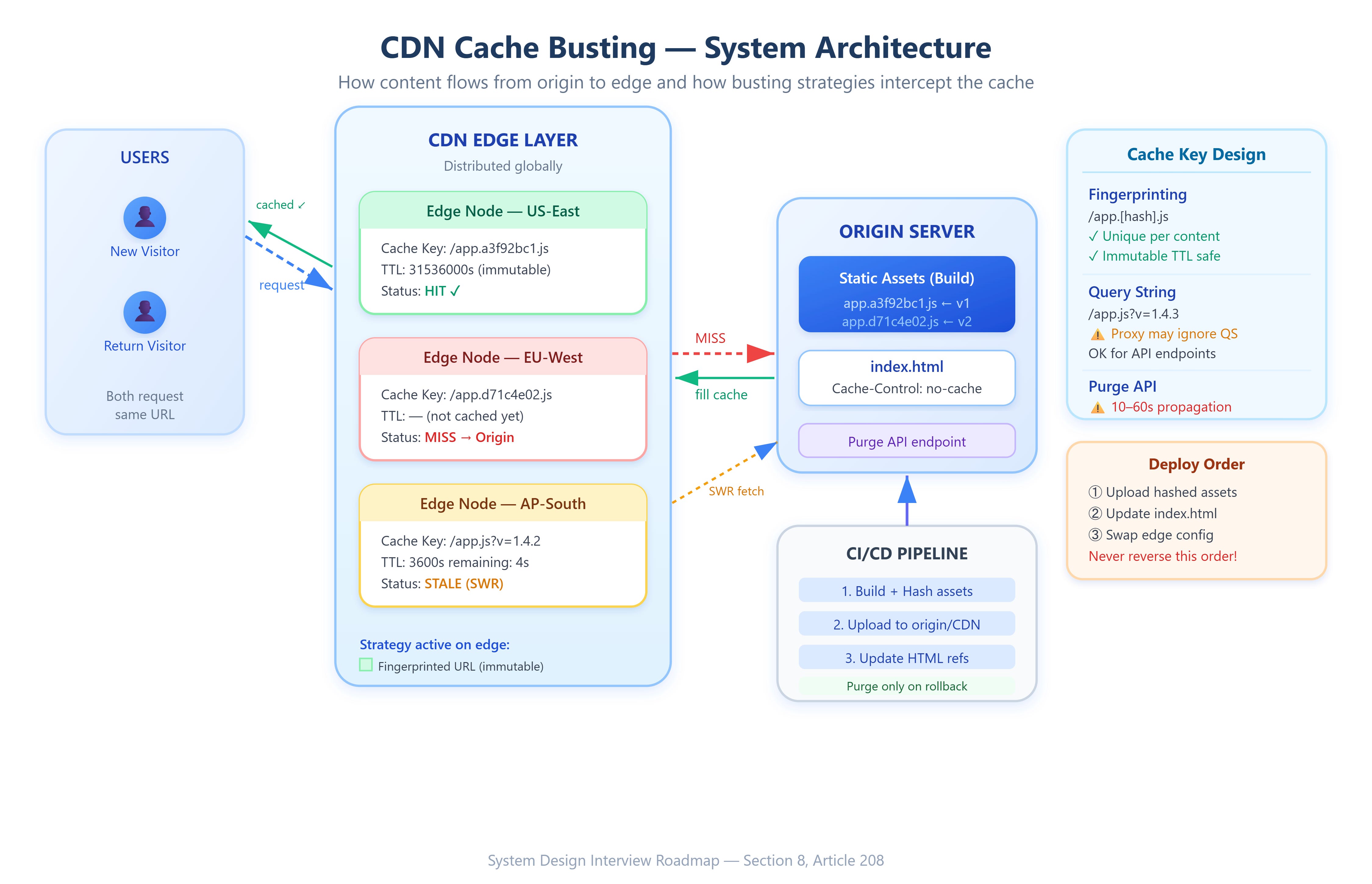
The most reliable strategy. Your build tool (Webpack, Vite, esbuild) computes a hash of the file’s content and embeds it in the filename:
app.js → app.a3f92bc1.js
app.js → app.d71c4e02.js  ← after a change
Since the URL changed, the CDN treats it as a new resource — no conflict with old caches. The old URL continues to serve the old file (good for users mid-session), while the new URL immediately serves fresh content. This is zero-downtime cache busting.
The key non-obvious detail: this requires your HTML index.html to not be heavily cached, since it must always reference the latest fingerprinted filenames. HTML typically gets Cache-Control: no-cache (revalidate every request) or a very short TTL, while fingerprinted assets get long-lived TTLs (Cache-Control: max-age=31536000, immutable).
2. Query String Versioning
app.js?v=1.4.2
app.js?v=1.4.3
Simpler to implement but less reliable. Some CDN configurations strip or ignore query strings when determining cache keys. Cloudflare, by default, includes query strings in cache keys — but intermediate proxies and some ISP-level caches may not. This strategy is appropriate for API responses or endpoints where fingerprinted filenames aren’t feasible.
3. CDN Cache Invalidation (Purge API)
Every major CDN exposes an API to explicitly purge cached objects by URL pattern. Cloudflare’s Cache Purge API, AWS CloudFront’s create-invalidation, and Fastly’s purge endpoints let you push a list of URLs or wildcard patterns that should be evicted immediately.
The failure mode: purge propagation is not instantaneous. CloudFront invalidations can take 10–60 seconds to propagate across all edge locations. During that window, some users get old content, some get new. Wildcard invalidations (/*) are especially dangerous at scale because they cause a thundering-herd effect: every edge node simultaneously fetches fresh content from origin, potentially overwhelming your origin servers if you have thousands of edge nodes and millions of cached objects.