
The Ghost in the Dashboard
It’s a classic on-call nightmare: CPU is at 8%, RAM is plenty, and disk I/O is idle, yet the application is throwing Connection refused or timing out. Adding more servers doesn’t help because the bottleneck isn’t computational—it’s socket saturation.
On Linux, every TCP connection consumes a file descriptor (FD). While a ulimit -n of 65,535 suggests high capacity, the bottleneck is often the application worker pool. If your app uses a thread-per-connection model and has 5,000 threads, those threads can be held hostage by slow clients
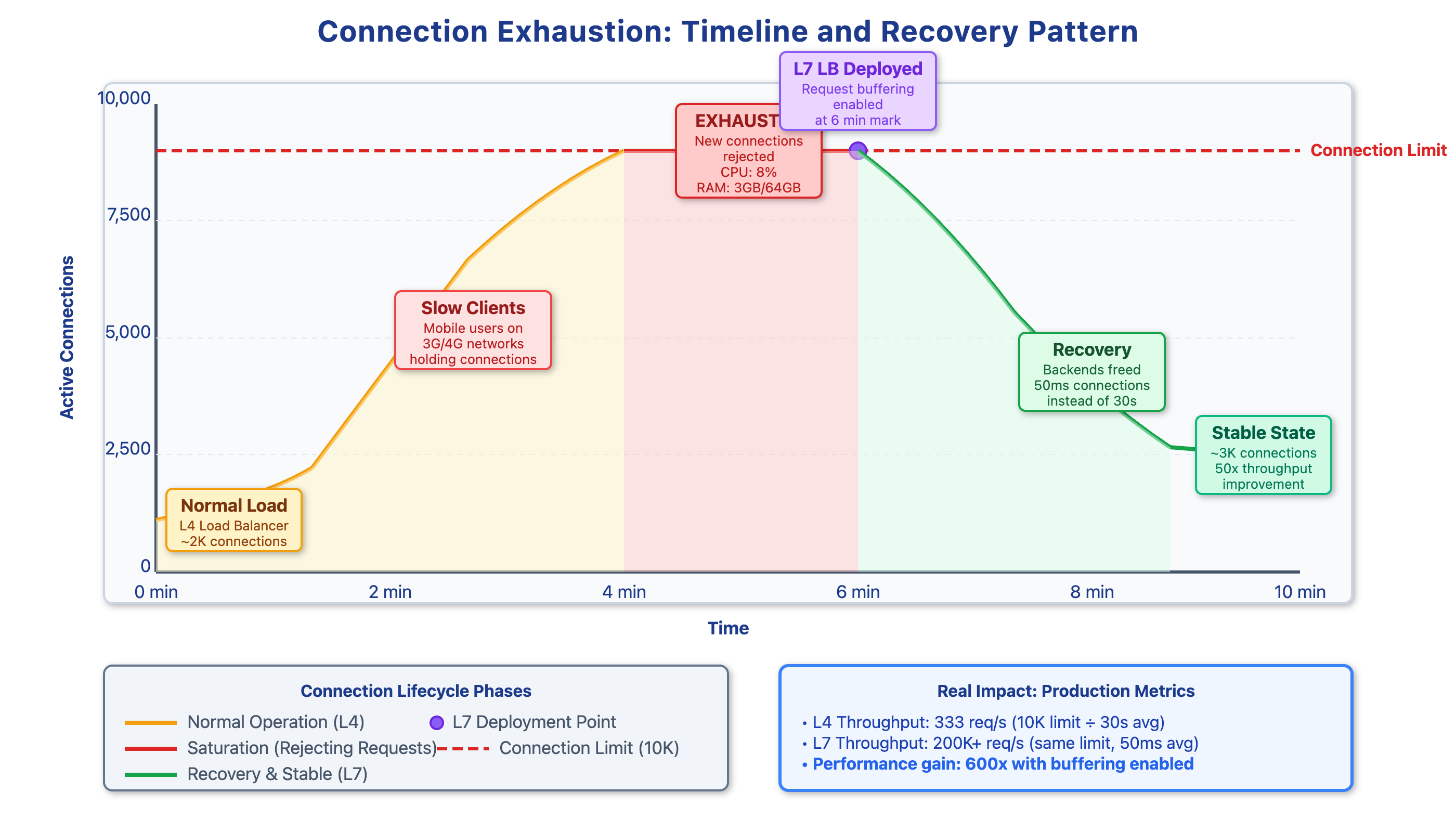
The Impact of Client Latency
The math of exhaustion is driven by “Long-Tail” latency:
Fiber Client: Completes a request in 50ms.
Mobile Client (Congested 5G/3G): Takes 30s to upload the same payload.
During that 30s, the mobile client occupies a file descriptor, kernel memory, and an application worker. If 20% of your traffic is slow, a modest arrival rate of 500 req/s can saturate a 10,000-connection limit in seconds. Once saturated, the kernel’s SYN queue fills, and the system begins dropping new connections (RST packets).
Why L4 Load Balancing Fails This Scenario
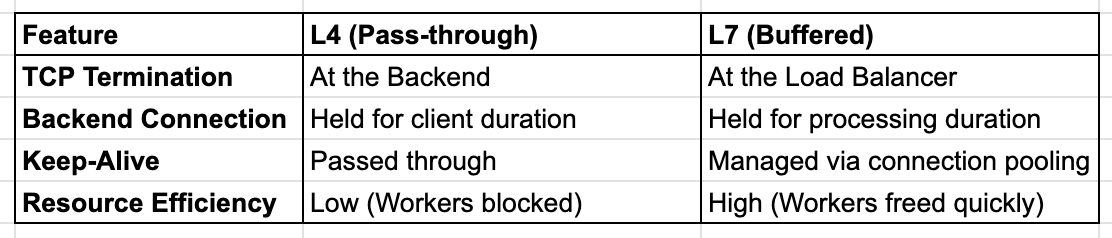
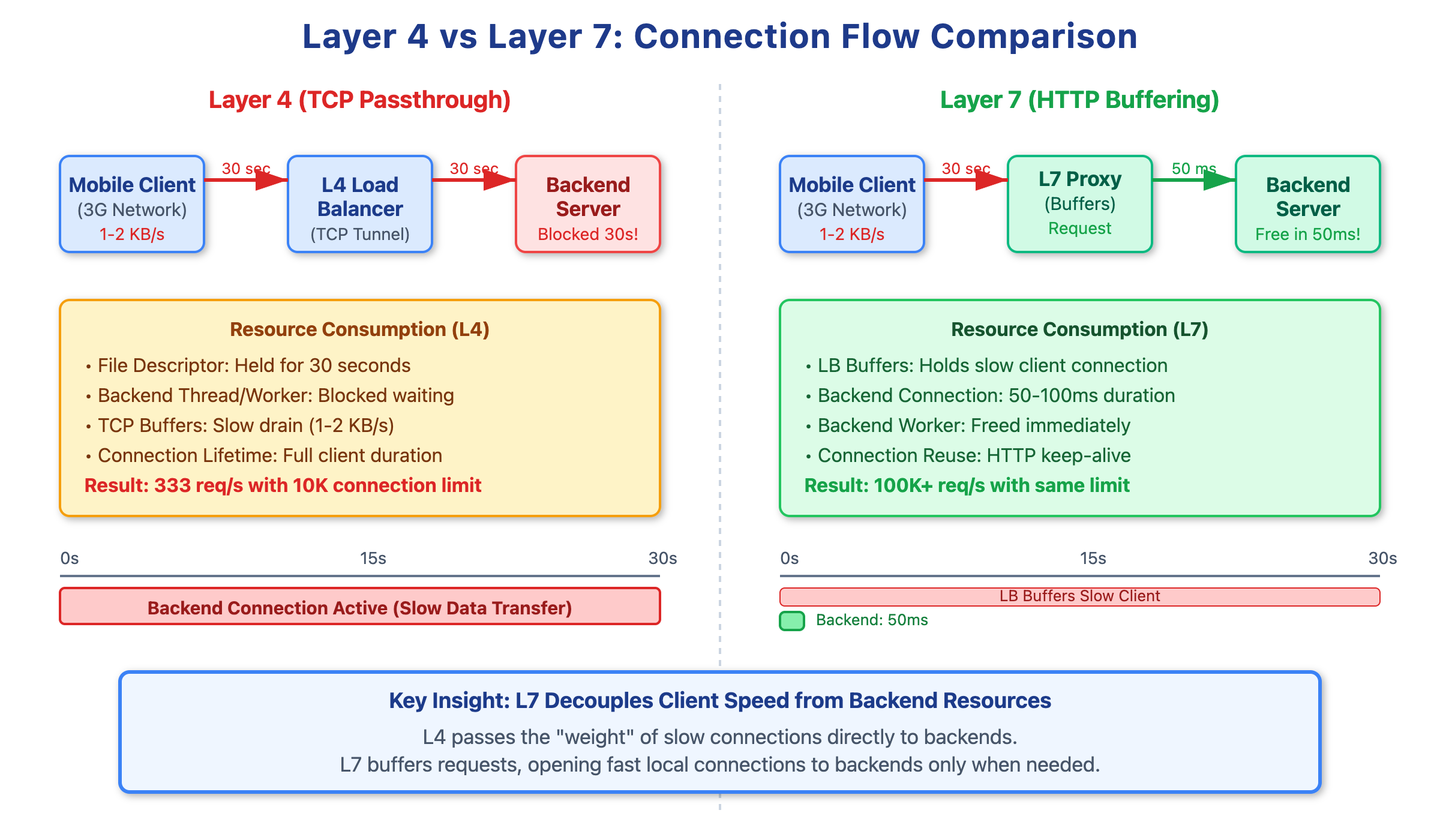
Layer 4 Load Balancers (like AWS NLB or hardware appliances) operate at the transport layer. They use NAT to forward packets but do not terminate the TCP connection. They essentially create a transparent tunnel.
This means the backend server is directly exposed to the client’s network conditions. If a client has 15% packet loss and a 2000ms RTT, your backend server’s socket stays in the ESTABLISHED state for the entire duration of that sluggish session. In this model, the backend is forced to “wait” at the same speed as the slowest client.
Layer 7 Buffering: The Decoupling Layer
A Layer 7 Load Balancer (Nginx, Envoy, HAProxy, or AWS ALB) terminates the TCP connection at the edge. The LB manages the slow client, reading the HTTP request headers and body into its own buffers.
Only after the request is fully received does the LB open (or reuse) a fast, local TCP connection to the backend. This transforms a 30-second client upload into a 50ms backend transaction.
Implementation and Tuning
To protect backends, implement an L7 proxy with aggressive buffering and specific connection limits.
Nginx Configuration Example:
Nginx
upstream backend_pool {
    server app1:8080 max_conns=1000; # Protects backend from thread exhaustion
    keepalive 64;                   # Maintains warm connections to backend
}

server {
    listen 80;
    client_body_timeout 30s;
    client_max_body_size 10M;

    location / {
        proxy_pass http://backend_pool;
        proxy_http_version 1.1;
        proxy_set_header Connection ""; # Required for keepalive
        proxy_buffering on;             # Buffer response from backend
        proxy_request_buffering on;     # Buffer request from client
    }
}
Production Monitoring
Standard CPU/RAM alerts won’t catch this. You must monitor:
LB Connection States: Track
ESTABLISHEDvs.TIME_WAITsockets.Backend Pending Requests: Monitor how many requests are queued at the LB waiting for a backend connection.
File Descriptor Usage: Set alerts at 70% of
ulimit -n.
Conclusion
By moving the burden of slow-client management to the edge (L7), you insulate your application logic from network volatility. The cost of running an Envoy or Nginx tier is negligible compared to the cost of scaling application servers that spend 99% of their time waiting for mobile ACK packets.
Demo Source Code : https://github.com/sysdr/sdir/tree/main/connection-exhaustion
Great article. Thanks for clarification