
Database Caching Layers: From Memory to Disk
System design isn’t a whiteboard exercise.
In the real world, documentation is rare and no one hands you a manual. Stop memorizing the CAP theorem and start understanding how it dictates database choices. Bridge the gap between the interview and production. Build systems, don't just draw them. Subscribe Now.
You're running a popular social media platform, and suddenly your database starts gasping for air. Users are refreshing their feeds frantically, but your system is crawling at a snail's pace. The culprit? Your database is drowning in repetitive queries, fetching the same profile pictures and user data thousands of times per second. This is where caching layers become your system's life jacket—they create multiple levels of fast access to frequently used data, dramatically reducing the load on your primary database.
Database caching layers represent one of the most critical yet misunderstood aspects of high-scale system design. Unlike simple key-value stores, these layers form a sophisticated hierarchy that mirrors how our own memory works—from lightning-fast but limited capacity at the top, to slower but vast storage at the bottom.
The Hidden Architecture of Speed
Think of caching layers as a series of increasingly larger but slower storage rings around your database. Each ring catches different types of data access patterns, and understanding their interplay is what separates systems that gracefully handle millions of requests from those that crumble under pressure.
Most engineers know about Redis or Memcached, but the real magic happens in understanding how these layers work together. The secret lies in recognizing that different data has different access patterns, temperature, and lifecycle requirements.
The Four Pillars of Database Caching
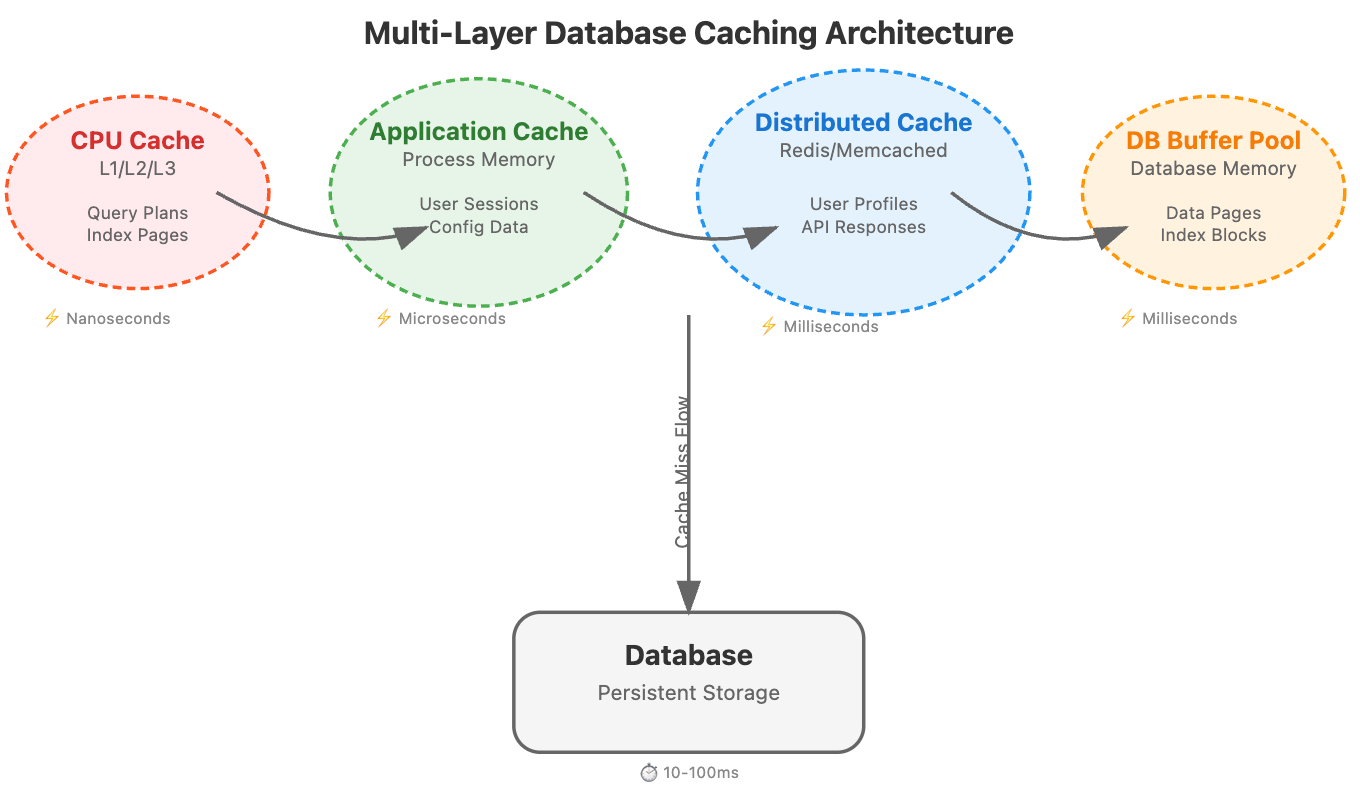
CPU Cache (L1/L2/L3): Your processor's built-in memory hierarchy handles frequently accessed query execution plans and index pages. This is often invisible to application developers, but database engines leverage it heavily for query optimization.
Application-Level Cache: This lives within your application process memory. It's blazingly fast but constrained by the memory limits of a single process. Perfect for frequently accessed configuration data, user sessions, or computed results that don't change often.
Distributed Cache Layer: Services like Redis, Memcached, or Hazelcast that sit between your application and database. This is where most engineers focus, but they often miss the nuanced configuration strategies that make the difference at scale.
Database Buffer Pool: Your database's own caching mechanism that keeps frequently accessed pages in memory. PostgreSQL's shared_buffers, MySQL's InnoDB buffer pool, or MongoDB's WiredTiger cache all fall into this category.
The Temperature-Based Caching Strategy
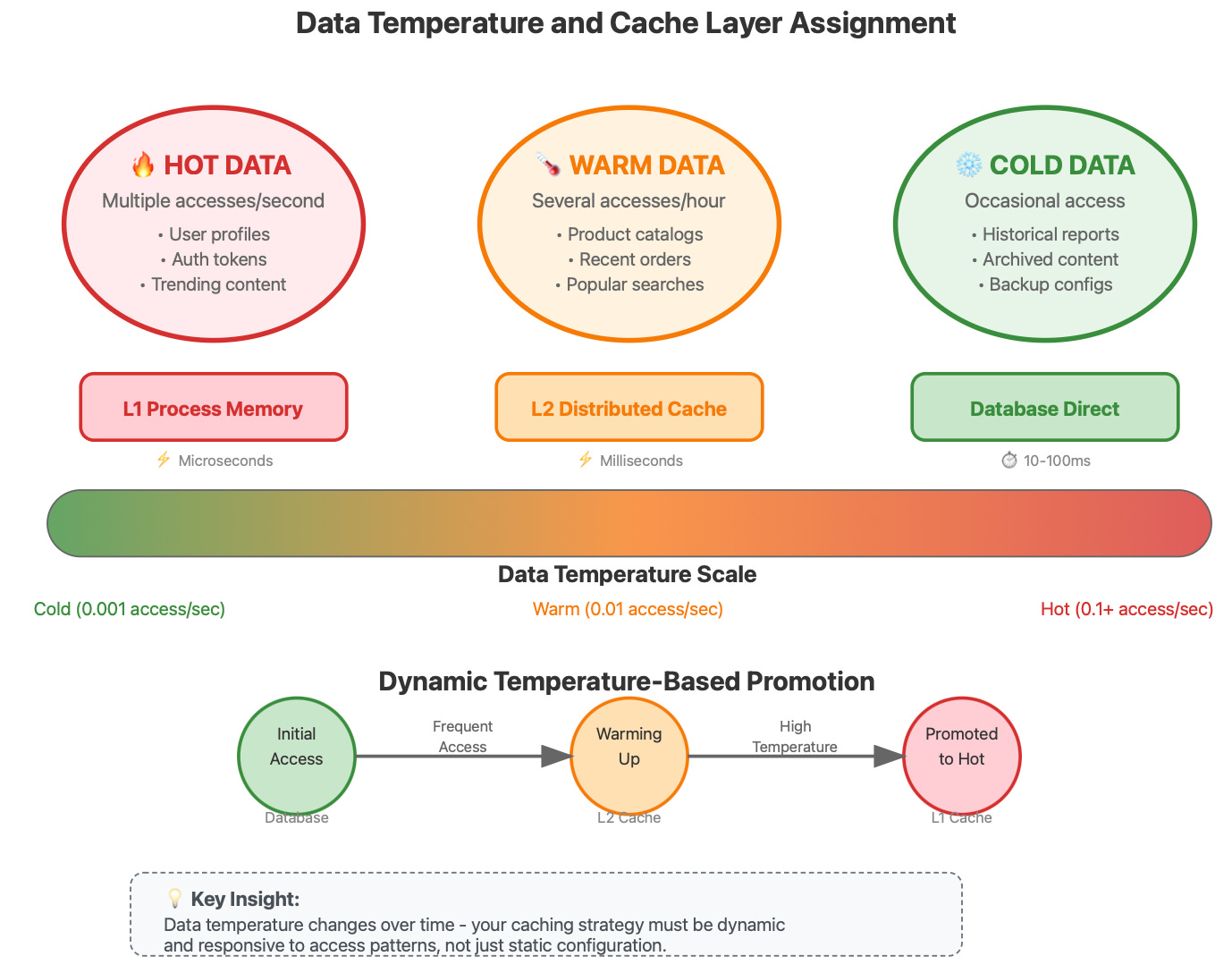
Here's an insight rarely discussed in mainstream resources: data has temperature, and your caching strategy should reflect this thermal model.
Hot Data: Accessed multiple times per second. User profile information, trending content, authentication tokens. This belongs in your fastest cache with aggressive prefetching.
Warm Data: Accessed several times per hour. Product catalogs, recent order history, popular search results. Distributed cache with moderate TTL works well here.
Cold Data: Accessed occasionally. Historical reports, archived content, backup configurations. This can live in disk-based caches or even be computed on-demand.
The breakthrough insight is that data temperature changes over time, and your caching layers need to be dynamic. A piece of content might be ice cold for months, then suddenly become blazing hot when it goes viral.
Real-World Architecture: How the Giants Do It
Netflix's Multi-Tier Caching Evolution
Netflix operates one of the most sophisticated caching architectures in the world, handling over 230 million subscribers with minimal latency. Their approach reveals several non-obvious insights:
They discovered that traditional cache replacement algorithms (LRU, LFU) don't work well for video content because viewing patterns are highly skewed—a small percentage of content gets massive traffic while the long tail sits cold. Netflix developed a custom algorithm called "Popularity-Based Replacement" that considers both recency and predicted future popularity.
Their CDN strategy uses geographic and temporal locality together. Content isn't just cached geographically close to users; it's pre-positioned based on predicted viewing patterns. If a show is trending in Asia, Netflix's algorithms push it to North American edge servers hours before the viewing wave hits.
Discord's Real-Time Caching Challenge
Discord faces a unique challenge: their data is both highly temporal (chat messages) and relationship-heavy (who can see what). Their caching strategy reveals insights about handling dynamic permission-based content.
They use a technique called "permission-aware caching" where cached data includes not just the content but metadata about who can access it. This prevents the common antipattern of cache invalidation on every permission change. Instead of invalidating cached messages when someone joins or leaves a channel, they cache messages with permission fingerprints and validate access at read time.
Amazon's DynamoDB Accelerator (DAX)
Amazon's DAX provides microsecond latency for DynamoDB operations, but the real innovation is in how it handles consistency models. DAX introduces the concept of "eventually consistent caching with conflict resolution."
When multiple cache nodes might have different versions of the same data, DAX doesn't just pick the latest timestamp. It uses application-semantic conflict resolution, where the cache layer understands the business logic of the data it's caching. For example, for counter values, it knows to sum conflicting increments rather than simply taking the latest value.
The Cache Coherence Problem Nobody Talks About
In distributed systems, cache invalidation becomes a distributed systems problem. The classic approach of invalidating cache entries when data changes doesn't scale when you have hundreds of cache nodes across multiple regions.
The insight that changed everything for large-scale systems: instead of invalidating cache entries, version them. Each piece of cached data carries a version number, and applications can decide how stale they're willing to accept data to be. This transforms cache invalidation from a synchronous, blocking operation into an asynchronous, eventual consistency problem.
The Write-Through vs Write-Behind Decision Matrix
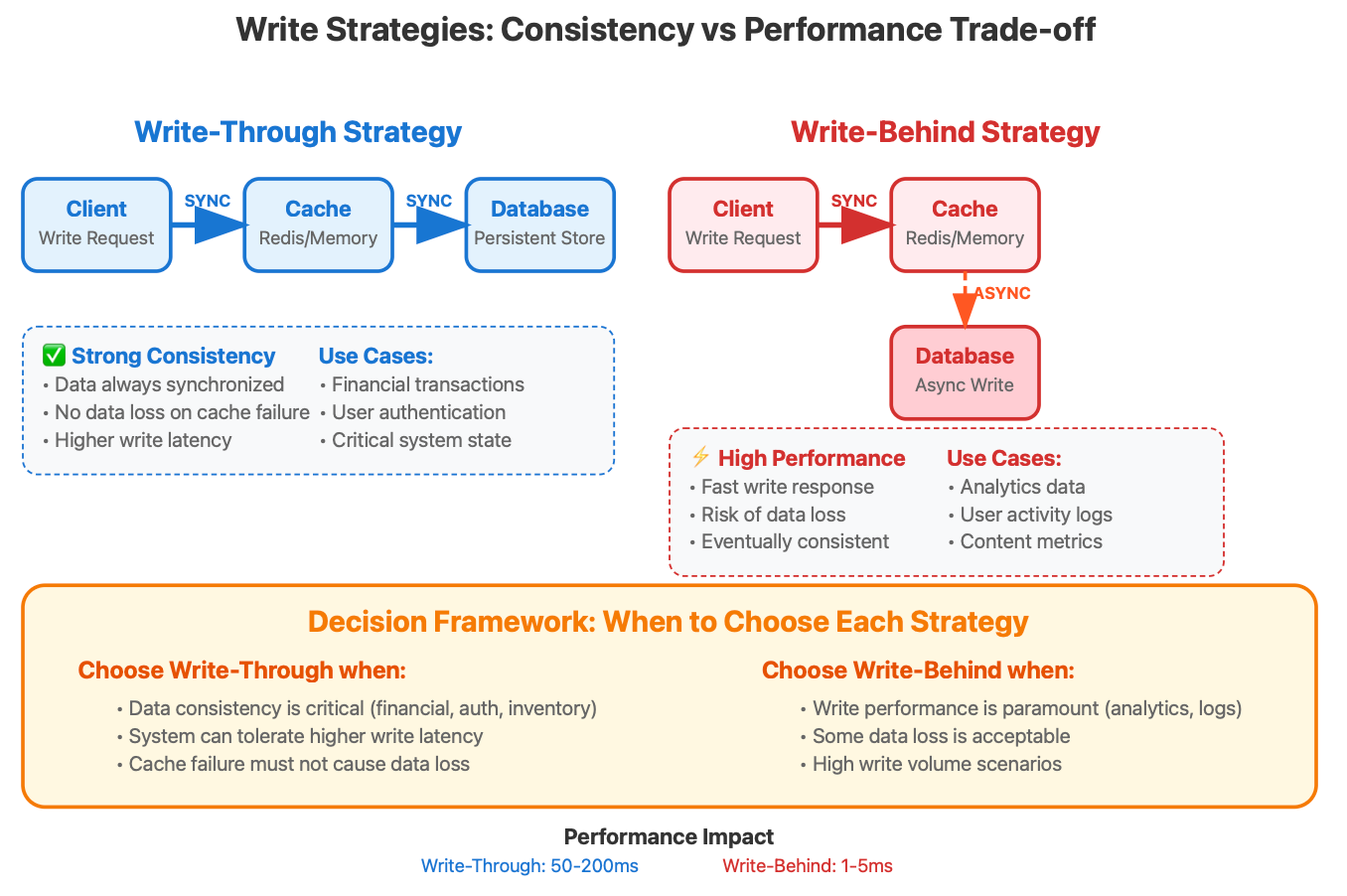
The choice between write-through and write-behind caching isn't just about performance—it's about understanding your system's failure modes and consistency requirements.
Write-Through Caching: Every write goes to both cache and database synchronously. This provides strong consistency but at the cost of write latency. Use this when data consistency is more important than write performance, such as financial transactions or user authentication data.
Write-Behind (Write-Back) Caching: Writes go to cache immediately, and database writes happen asynchronously. This provides excellent write performance but introduces the risk of data loss if the cache fails before the write reaches the database.
The rarely discussed middle ground is "Write-Behind with Confirmation." The cache acknowledges the write immediately but also provides a callback mechanism to confirm when the write has been durably persisted. This gives you the performance benefits of write-behind with the reliability guarantees of write-through.
Practical Implementation: Building Your Own Multi-Layer Cache
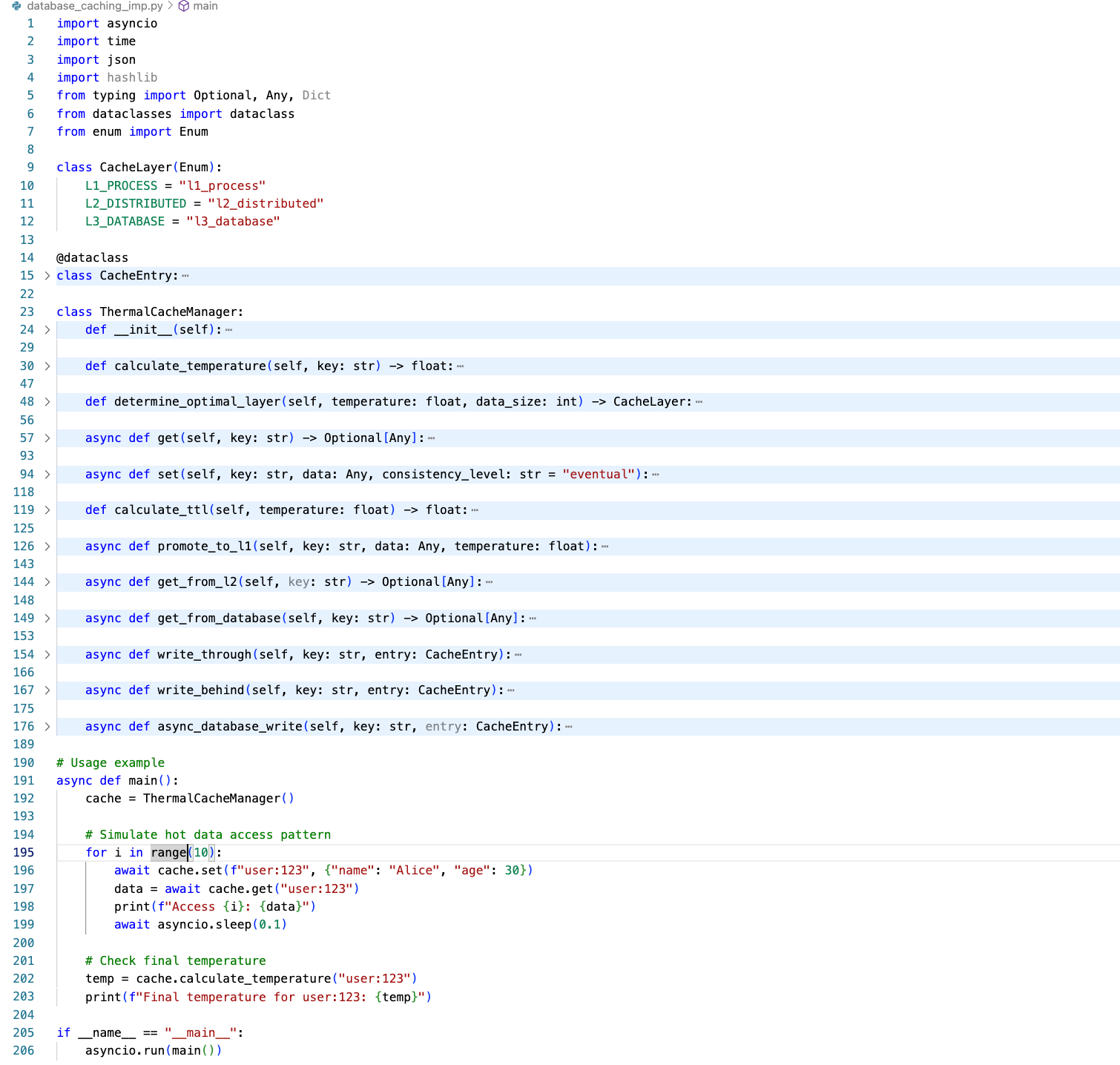
Let's build a production-ready caching layer that demonstrates these concepts:
Implementation Source file :
https://github.com/sysdr/sdir/blob/main/database_caching_imp.py
Hands-On: Cache Layer Behaviour Demo
Let's build a realistic multi-layer caching demonstration using Docker containers. This approach helps you understand how caching layers work together in a distributed environment, similar to production systems. We'll create separate containers for different cache layers and show you exactly how to verify the behavior through monitoring and logs.
Bash Script to implement Demo:
https://github.com/sysdr/sdir/blob/main/database_caching.sh
Understanding the Docker-Based Setup
Before diving into the implementation, let's understand why Docker containers provide a better learning experience than a simple bash script. Each container represents a different layer in our caching hierarchy, making the concept of "layers" much more tangible. You'll see network calls between containers, observe actual latency differences, and monitor each layer independently—just like you would in a real production environment.
Here's our complete Docker-based demonstration that creates a realistic multi-layer cache system:
How to Run and Verify the Demonstration
Make the script executable and run it to see the complete caching behavior:
chmod +x docker_cache_demo.sh
./docker_cache_demo.sh
Verification Explained
Understanding how to verify caching behavior is crucial for production systems. Here are the specific techniques this demo teaches you:
Real-Time Log Monitoring: While the demo runs, open separate terminal windows to watch what happens in each layer. This technique helps you understand the flow of requests through your caching hierarchy:
# Terminal 1: Watch application logs (L1 cache hits/misses)
docker logs -f app-with-l1-cache

# Terminal 2: Watch database logs (L3 access patterns)
docker logs -f mock-database-l3
Performance Measurement: The demo includes timing measurements that show you the actual performance difference between cache layers. Notice how the first request to any key takes longer because it must reach the database, while subsequent requests are served from memory:
# Compare response times
time curl -s http://localhost:3000/get/performance_test
time curl -s http://localhost:3000/get/performance_test  # Should be faster
Cache Statistics Analysis: The application exposes a /stats endpoint that shows you the internal state of the L1 cache. This pattern is essential in production systems for monitoring cache effectiveness:
# View detailed cache statistics
curl http://localhost:3000/stats | jq '.'
Network Traffic Verification: The containerized setup lets you verify that network calls are actually happening between layers, which helps you understand the cost of distributed caching:
# Check network connectivity between containers
docker exec app-with-l1-cache ping -c 3 mock-database-l3
What This Demo Teaches You
This Docker-based approach provides several learning advantages over a simple script. You experience the actual network latency between distributed cache layers, observe real container-to-container communication, and practice the monitoring techniques you'll need in production environments. The containerized setup also makes it easy to experiment with different configurations—you can modify the TTL values, change the cache sizes, or add additional cache layers by editing the container startup commands.
The verification methods shown here mirror what you'll use in production systems: log analysis for understanding behavior patterns, performance timing for measuring cache effectiveness, and statistics endpoints for monitoring cache health. These skills transfer directly to managing real caching systems at scale.
Key Insights for Production Systems
Cache Warming Strategy: Don't wait for cache misses to populate your cache. Implement predictive cache warming based on user behavior patterns. If users typically check their notifications after posting content, warm the notification cache immediately after a post is created.
Layered Invalidation: When invalidating cache entries, consider the cascade effect. Invalidating a user's profile cache might also require invalidating their posts cache, comments cache, and notification cache. Design your invalidation strategy as a dependency graph, not individual operations.
Consistency Boundaries: Define clear consistency boundaries for your cached data. Some data can be eventually consistent (like view counts), while other data requires strong consistency (like account balances). Your caching strategy should reflect these business requirements.
Monitoring Cache Temperature: Implement metrics to track data temperature over time. This helps you identify when your caching strategy needs adjustment and can predict capacity requirements for different cache layers.
The mastery of database caching layers isn't just about implementing Redis or Memcached—it's about understanding data access patterns, consistency requirements, and failure modes. When you design your next system, think beyond simple key-value caching. Consider the thermal properties of your data, the optimal layer for each type of information, and how these layers work together to create a resilient, high-performance storage hierarchy.
Your users will never see your caching architecture, but they'll definitely feel its impact in every fast page load and responsive interaction. That's the hidden magic of well-designed caching layers—they make the impossible feel effortless.