
This is the question that defines the file sync and storage archetype. Eight questions in the question bank are variants — iCloud Photos, distributed file systems, cloud backup services, Git-style version control storage, CDN edge caching. They share a spine: chunked file storage, metadata management, multi-device consistency, and conflict resolution. Internalize this one and you can answer all eight.
The surface question sounds like object storage with a UI. The probe underneath is what separates candidates: what happens when two devices modify the same file simultaneously? That conflict resolution problem — deceptively simple on the surface, genuinely hard in distributed systems — is where every L5+ interview on this question goes.
For L4 / mid-level: upload/download flow and basic chunked storage. For L5 / senior: delta sync (only transfer what changed, not the whole file), deduplication, and conflict detection. For L6 / staff: vector clocks or last-writer-wins with operational transforms for true conflict resolution, the consistency model across devices, and what Dropbox actually does differently from naive S3.
The Question
“Design Google Drive or Dropbox. Users upload files from their devices. Files are accessible from any of their devices and sync automatically when changed.”
Common variants:
- “Design iCloud Drive / Apple Files.”
- “Design a cloud backup service.”
- “Design the file sync layer for a collaborative tool.”
- “Design a distributed file system.”
Step 1 — Clarify Before You Draw
1. Individual file storage or collaborative editing? Dropbox stores files — one writer at a time, sync on save. Google Docs is collaborative editing — multiple simultaneous writers with operational transforms. These are fundamentally different systems. Clarify and scope to Dropbox-style unless told otherwise.
2. What file types and size limits? Documents, images, video — or everything? Max file size matters: Dropbox supports files up to 50 GB. A naive single-upload approach collapses above a few hundred MB.
3. Multi-device sync — how many devices per user? Average user: 3–5 devices. Power user: 10+. Each device must receive all changes to synced folders. This drives the notification and sync architecture.
4. Versioning and deleted file recovery? Most cloud storage products retain file versions (Dropbox keeps 30–180 days of version history). Deleted files go to trash with a retention window. State the assumptions.
5. What scale? Dropbox at its peak: 700 million registered users, 500 million files uploaded per day. Working assumptions: 100M DAU, 1B files stored, average file size 1 MB.
6. What’s the SLO? File upload acknowledges within 5 seconds for files under 10 MB. Sync propagates to other devices within 30 seconds of the change. These two SLOs drive the architecture.
Step 2 — Estimate
- 100M DAU, each uploads/modifies ~5 files/day average → 500M file operations/day → ~5,800 ops/sec
- Average file size 1 MB → 5.8 TB/day of new or modified data ingested - Total files stored: 1B files × 1 MB average = 1 PB
- With deduplication (identical files stored once): real storage closer to 400–600 TB (60% dedup ratio is typical)
- Metadata per file: ~500 bytes (name, path, size, hash, version, owner, timestamps) → 500 bytes × 1B files = 500 GB of metadata — fits comfortably in a sharded relational database
- Change notifications: 500M operations/day / 86,400 seconds × 3 devices per user average = ~17,000 notification fanouts/sec
The deduplication estimate is the senior signal in estimation. Dropbox publicly states that deduplication dramatically reduces storage costs because many users store the same files (PDFs, installers, stock photos). Mentioning deduplication in the estimation shows you’ve thought about the system’s economics, not just its architecture.
52 FAANG Question Vault — $299 one-time (or $249 for paid subscribers)
All 52 walkthroughs + 52 drill cards + 6 framework cheatsheets + the Senior+ System Design Playbook. Everything, immediately. Lifetime access with all future updates included. → [VAULT CHECKOUT LINK]
Step 3 — API Design
POST /v1/files/upload/init
Body: { file_name, file_size_bytes, content_hash_sha256, parent_folder_id } Response: {
upload_id: string,
upload_urls: [{ chunk_index, presigned_s3_url }], ← chunked upload
chunk_size_bytes: 4194304 (4 MB)
}
PUT {presigned_s3_url} (direct to S3 — server not in the upload path)
Body: binary chunk data
POST /v1/files/upload/complete
Body: { upload_id, chunk_etags: [{ chunk_index, etag }] }
Response: { file_id, version_id, path, created_at }
GET /v1/files/:file_id/download
Response: { presigned_download_url, expires_at }
GET /v1/sync/changes
Query: { cursor: string, limit: int } ← long-poll or SSE
Response: { changes: [...], new_cursor: string, has_more: bool }
POST /v1/files/:file_id/conflict
Body: {
local_version_id, server_version_id, resolution: “keep_local” | “keep_server” | “keep_both”
}
The senior moves on this API:
Chunked upload with presigned URLs. Files go directly from the client to S3 — the API server never handles the binary data. This eliminates the API tier as a bandwidth bottleneck. The upload_id ties the chunks together; the etags from each chunk PUT allow S3 to assemble the final object via S3 multipart upload completion.
The /sync/changes endpoint with cursors. This is the Dropbox API model (they call it list_folder/continue). Instead of polling “what changed since timestamp X,” the client maintains an opaque cursor that encodes its sync state. The server returns everything the client has missed since that cursor position. This handles offline sync correctly: a device that was offline for 2 weeks reconnects, passes its cursor, and gets all 2 weeks of changes in one call.
The /conflict endpoint. Most candidates forget this exists. Conflict resolution is a user-facing operation — the client detects a conflict, shows the user, and the user or the system decides. Having an explicit endpoint for conflict resolution signals you’ve thought about the user-facing side of the distributed systems problem.
Step 4 — Data Model
files table
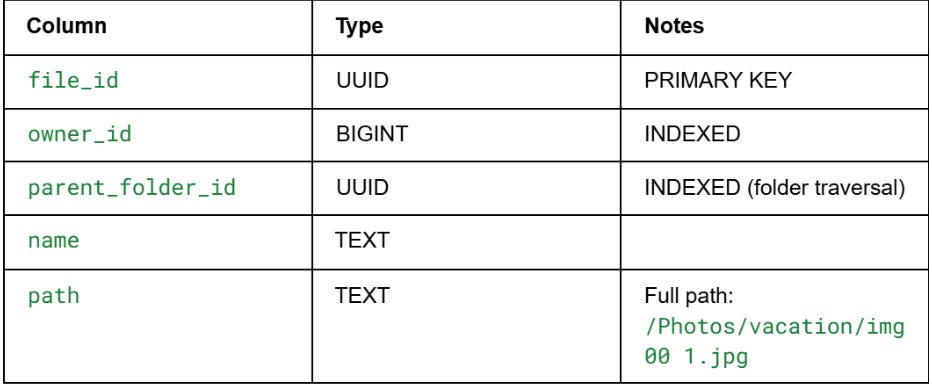
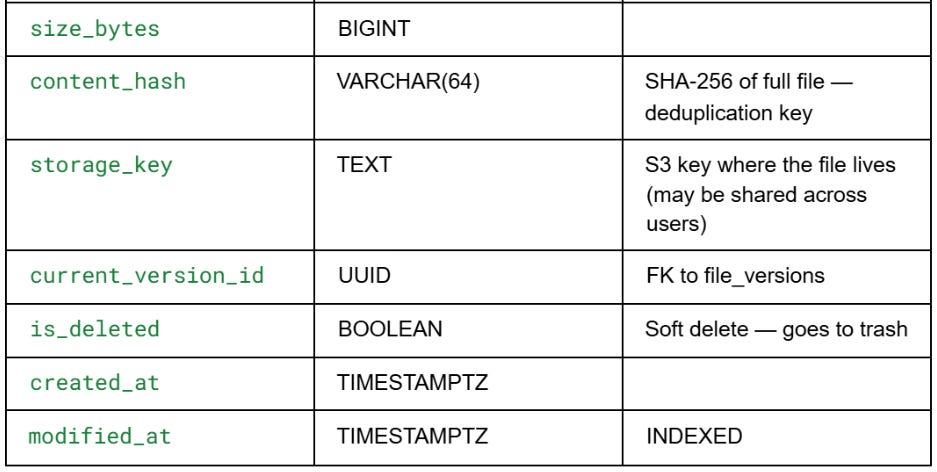
The content_hash → storage_key mapping is the deduplication mechanism. Before storing a file, the server checks whether content_hash already exists in the storage index. If it does, it reuses the existing S3 object and just creates a new metadata row pointing to it. The same file can be “owned” by millions of users but stored in S3 once.
file_versions table
version_id, file_id (FK), version_number, content_hash, size_bytes,
storage_key, created_by_device_id, created_at, is_current
Every modification creates a new version row. The is_current flag moves to the newest version. Old versions are retained for 30 days (configurable), then the storage_key reference is eligible for deletion if no other version or file points to it.
sync_cursors table
cursor_id, device_id, user_id, last_processed_change_id, updated_at
Each device has a cursor. When the device calls /sync/changes, the server returns all changes after last_processed_change_id for that user, then updates the cursor. The cursor is device-specific, not user-specific — each device tracks its own sync position independently.
change_log table — the sync feed
change_id (SEQUENTIAL), user_id (INDEXED), file_id, change_type
(created/modified/deleted/moved),
version_id, changed_by_device_id, changed_at
This is the append-only event log that drives sync. Every file operation appends a row. When a device calls /sync/changes?cursor=X, the query is simply: SELECT * FROM change_log WHERE user_id=:uid AND change_id > :cursor_change_id ORDER BY change_id LIMIT :limit. Fast, simple, correct.
The change_id is a sequential integer (not UUID). Sequential IDs make the range query above maximally efficient. They can be generated by Postgres sequences on a per-user basis, or by a distributed ID sequence (Snowflake-style, with the user_id encoded in the ID).
