
This is the question that defines the marketplace and matching archetype. Ten questions in the question bank are variants of it — DoorDash delivery, Airbnb booking, Tinder matching, parking reservation, surge pricing, ride-share fraud. They share a spine: a supply side, a demand side, a location component, and a real-time matching requirement. The architecture that works for Uber dispatch, with minimal modification, works for all ten.
The surface question — “design Uber” — is a 4-hour answer. Interviewers narrow it deliberately: “design the dispatch system,” “design how a driver gets matched to a rider,” “walk me through what happens between the rider hitting ‘Request’ and the driver getting a notification.” All three collapse to the same probe: how do you find the nearest available supply in real time, at scale, without burning down your database on every request?
The answer involves a data structure most candidates haven’t touched since their algorithms course: geospatial indexing. Specifically, quadtrees or geohashing — and knowing which one and why is the senior signal.
For L4 / mid-level: describe the matching flow and a naive approach. For L5 / senior: articulate the geospatial indexing choice with its trade-offs. For L6 / staff: the consistency model across supply/demand state, the surge pricing data flow, multi-city scaling, and what happens when a driver’s GPS signal drops.
The Question
“Design the Uber dispatch system. A rider requests a ride. The system finds nearby available drivers and assigns one to the rider.”
Common variants:
“Design DoorDash / UberEats food delivery dispatch.”
“Design Lyft’s matching system.”
“Design a system to match drivers to delivery orders in real time.”
“Design the driver-to-rider matching at Uber.”
All four are the same architecture. DoorDash has one additional dimension — the restaurant (a fixed supply point instead of a moving one) — but the matching logic is identical.
Step 1 — Clarify Before You Draw
Six questions. Two of them are load-bearing for the whole design.
1. What does “dispatch” include — match only, or also route and surge? Dispatch in the narrow sense is “find a driver and assign them to a rider.” Routing (which road to take) is a separate system (Google Maps API or in-house). Surge pricing (dynamic fare) is another separate system. Clarify scope explicitly. Design the matching layer; acknowledge the others exist.
2. How many active drivers? What’s the geography — one city or global? Active drivers in a single city: tens of thousands. Globally: millions. This shapes whether your geo-index fits in memory on one machine or needs distribution. For a US metro at peak, 10,000–50,000 active drivers is a reasonable working number. Global scale: 5–10M.
3. How frequently do drivers update their location? Every 4–5 seconds is typical. This is a high-frequency write stream — 50,000 drivers × 1 write/4s = ~12,500 writes/sec in one busy metro. Globally: millions of writes/sec. State this number; it drives the design of the location ingestion layer.
4. What’s the matching latency SLO? A rider hits “request” and expects a driver to accept within 30–60 seconds. The matching decision itself should happen in milliseconds — sub-100ms for the initial candidate selection. If it takes 5 seconds to find a candidate, the experience breaks.
5. Can a driver be matched to multiple requests simultaneously? No — a driver has one state: available or not. This is the consistency problem at the heart of the question. Two riders cannot be dispatched to the same driver. The system that manages this state is load-bearing.
6. What failure modes matter most? Driver goes offline mid-trip. GPS signal drops. Driver declines the match. Rider cancels after match. Each one requires a state machine transition. State the three most important ones out loud.
Step 2 — Estimate
Working assumptions for a single large metro deployment:
50,000 active drivers at peak
200,000 ride requests per hour at peak = ~55 ride requests/sec
Driver location update: every 4 seconds, so 50,000 / 4 = 12,500 location writes/sec
Matching query: for every ride request, find all drivers within ~2 km radius
Average matching candidate set: 20–50 drivers
End-to-end dispatch latency target: < 100ms for candidate selection, < 30s for driver acceptance
Location data per driver per update: ~100 bytes (driver_id, lat/lng, timestamp, status).
Writes: 12,500/s × 100 bytes ≈ 1.25 MB/s. Trivial for a single machine.
If global (5M drivers): 5M / 4 = 1.25M writes/sec. Serious — needs distributed location ingestion. But for this walkthrough, start with the single-metro case and note the global extension.
The geo-index in memory for 50,000 drivers: 50,000 × 100 bytes = 5 MB. Fits entirely in memory on a single machine. This insight — that the active driver set for one city is tiny — is what enables the in-memory geo-index approach.
Step 3 — API Design
Three endpoints. The first is rider-facing, the second is driver-facing, the third is the internal matching call.
POST /v1/rides/request
Headers:
Authorization: Bearer {rider_token}
Body:
pickup_lat: float
pickup_lng: float
destination_lat: float
destination_lng: float
ride_type: “uberx” | “pool” | “xl” | “black”
Response:
ride_id: “r_xxx”
status: “searching”
eta_to_pickup_seconds: integer (estimate, not a promise)
price_estimate: { low_cents, high_cents, surge_multiplier }
PUT /v1/drivers/location
Headers:
Authorization: Bearer {driver_token}
Body:
lat: float
lng: float
heading: float (degrees)
speed_mps: float (meters/sec)
status: “available” | “on_trip” | “offline”
Response: 200 (ack)
POST /v1/dispatch/match (internal, not public-facing)
Body:
ride_id: “r_xxx”
pickup_lat, pickup_lng
ride_type
Response:
candidate_drivers: [{ driver_id, distance_meters, eta_seconds, rating }]
The senior move on location updates: note that the driver app batches and sends at 4-second intervals, not on every GPS tick (which might be 1-second intervals). Batching reduces write load by 4x and extends driver battery life. Saying this out loud — that the client has a role in write amplification — is an insight most candidates miss.
heading and speed_mps in the location update. Junior candidates send only lat/lng. Senior candidates send velocity vector too. Why: ETA estimation to a pickup point requires knowing not just where the driver is but which way they’re going and how fast. A driver 500m away facing the wrong direction on a one-way street is further than a driver 700m away pointed at you. The heading/speed fields feed the ETA model.
Step 4 — Data Model
Four stores. The geo-index is the unusual one.
drivers table — source of truth for driver state
driver_id, name, vehicle_type, license_plate, rating_avg, total_trips,
current_status (ENUM: available/on_trip/offline/suspended),
current_lat, current_lng, last_location_update, created_at
Sharded by driver_id. The current_status and current_lat/lng columns are updated frequently — this is the consistency-critical state. More on that in Step 6.
rides table — the ride state machine
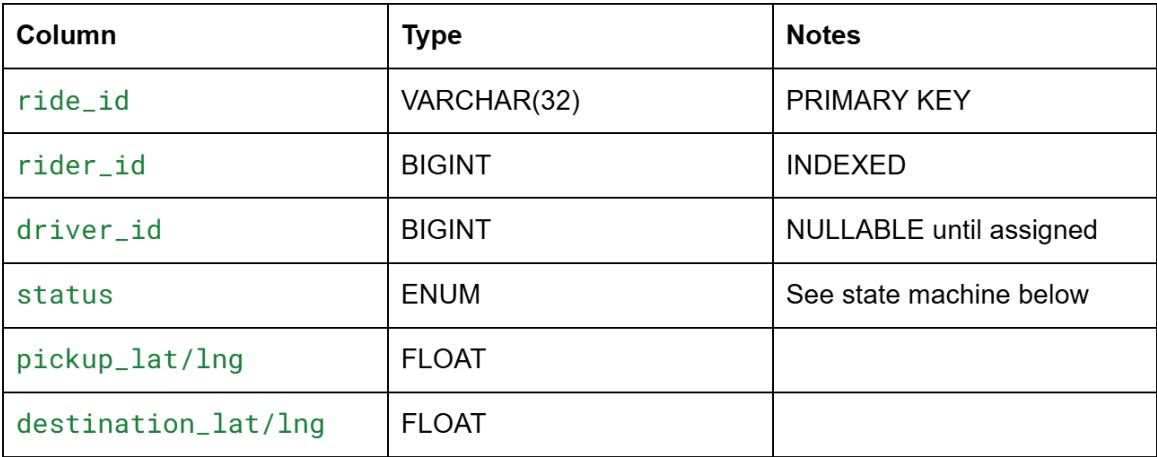
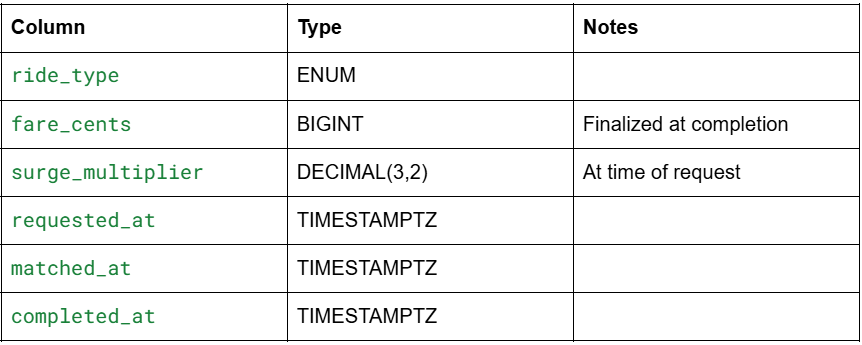
Ride state machine: searching → matched (driver found) → accepted (driver acknowledged) → driver_en_route → arrived → in_progress → completed | cancelled
Any state can transition to cancelled. The driver_id is only set at the matched transition. If a driver declines, status reverts to searching and the matching process re-runs.
location_history — time series store
Not your OLTP database. Location events are time-series data: (driver_id, lat, lng, timestamp, heading, speed). At 12,500 events/sec, that’s 1 billion events/day in one metro. You don’t store this in Postgres. You use a time-series database (InfluxDB, TimescaleDB, Cassandra with a time-ordered key) or push to a data lake for analytics.
The hot query (”where is this driver right now?”) hits the geo-index, not this table. This table is for analytics, replay, and dispute resolution (”I was at X at time T — prove it”).
driver_geo_index — the in-memory geo-index
This is the heart of the system. Not a SQL table. An in-memory spatial index that answers “which drivers are within radius R of point (lat, lng) in sub-millisecond time.”
Two real options: quadtrees or geohashing. This is Step 6’s deep dive.
Preparing for a distributed systems interview?
→Download the free Interview Pack
→ Subscribe now to access source code repository - 200 + coding lessons
