Introduction
A training job lands in your cluster. It requests 4 GPUs. Your cluster has 8 GPUs across 4 nodes — 2 per node. The job sits
Pendingfor 11 minutes before the scheduler finds a fit. Meanwhile, a researcher watching a progress bar assumes their cloud bill is accumulating. It is. The cluster is doing nothing useful. This is not a capacity problem. It is a scheduling problem, and it is more common than most platform teams admit.
How Kubernetes Sees a GPU
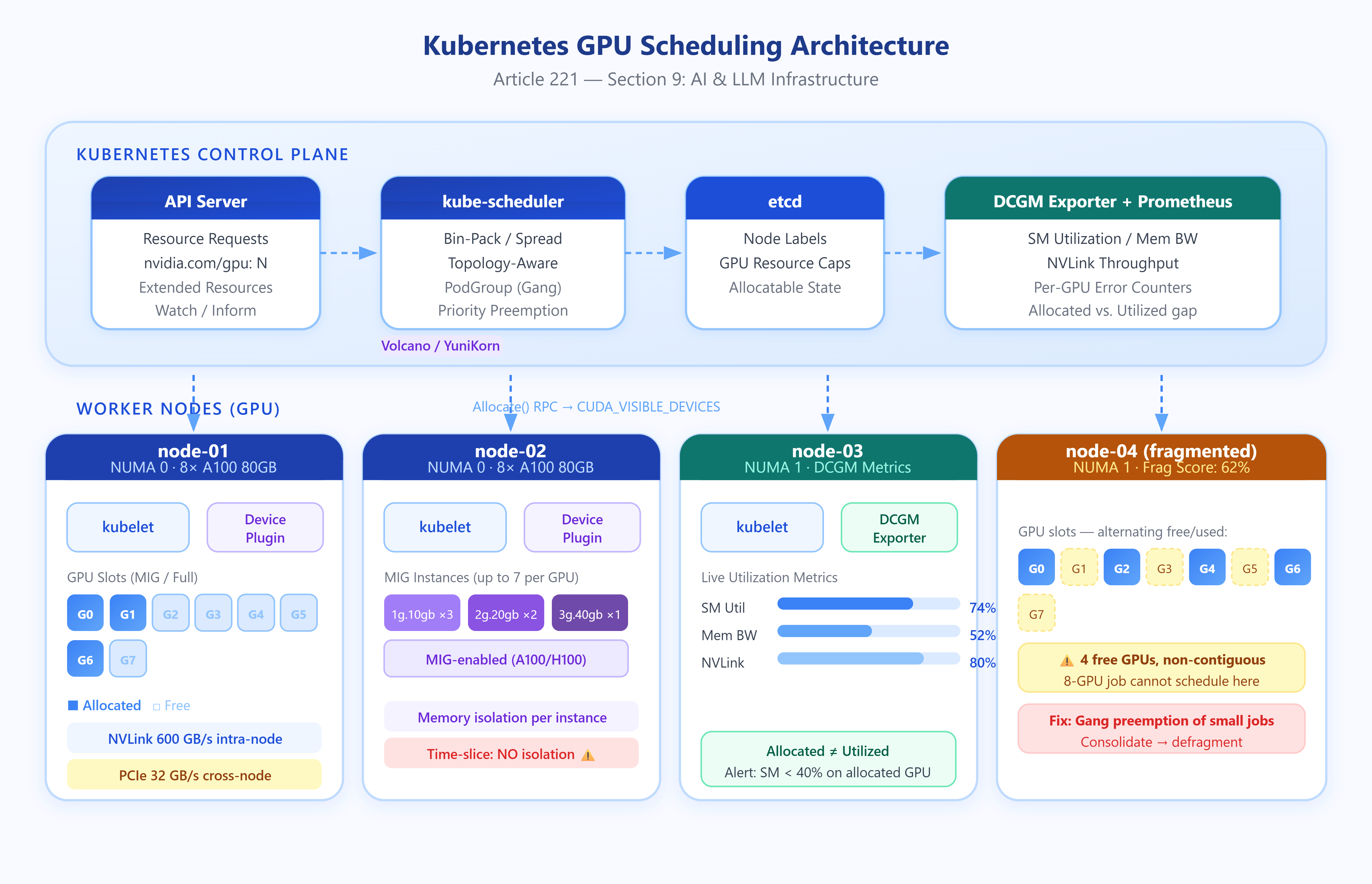
Kubernetes has no native GPU awareness. The kernel does. The gap is bridged by a device plugin — a DaemonSet running on each node that advertises resources to the kubelet using a gRPC interface. NVIDIA’s device plugin, for instance, registers nvidia.com/gpu as an extended resource and tells the kubelet exactly how many are available.
When a pod requests
nvidia.com/gpu: 2, the scheduler treats this resource identically to how it treats CPU or memory: as an integer that must be satisfied on a single node. The GPU is not a shared resource in the default model. A GPU requested by one pod is exclusively allocated to it until the pod terminates. This matters enormously for utilization math.
The scheduler’s default behavior is bin-packing when LeastAllocated priority is off, or spreading when it’s on. For GPU workloads, bin-packing tends to produce better utilization — it concentrates GPU jobs onto fewer nodes, leaving entire GPU nodes free for large multi-GPU jobs rather than leaving each node half-occupied and unusable.
What Happens at Allocation
The scheduler scores candidate nodes using configured priority functions.
A node passes if its free
nvidia.com/gpucount is ≥ the pod’s request.The kubelet on the winning node calls the device plugin’s
Allocate()RPC.The device plugin returns a set of environment variables (
CUDA_VISIBLE_DEVICES) and optional mounts.The container runtime injects these into the container, making specific GPU indices visible.
The pod never directly names a GPU. It gets whatever the plugin assigns. This is by design — the plugin handles NUMA affinity, topology constraints, and MIG configuration below the Kubernetes layer.
MIG and Time-Slicing Change the Unit of Allocation
On NVIDIA A100 and H100 GPUs, Multi-Instance GPU (MIG) partitions a physical GPU into isolated instances with dedicated memory and compute slices. A100 80GB can yield up to 7 MIG instances (
1g.10gbprofile), each behaving like an independent smaller GPU. The device plugin can advertise these asnvidia.com/mig-1g.10gbresources. A pod requesting one instance gets guaranteed isolation — no memory bandwidth contention with other tenants on the same card.
Time-slicing is the alternative for GPUs that don’t support MIG (or when you need more than 7 partitions). The plugin oversubscribes the GPU, advertising N logical GPUs where N = physical × replicas. Multiple pods get CUDA_VISIBLE_DEVICES pointing at the same physical device. There is no memory isolation. If your LLM inference pod OOMs, it takes every co-located pod with it.